


FAQs
What is pool service software?
Pool service software is an online platform that centralizes the core functions of running a pool service business — scheduling, dispatch, invoicing, customer management, chemical tracking, and reporting — in a single system. It replaces disconnected tools like spreadsheets and paper service reports.
Do I need pool service software if my business is small?
Size isn't the determining factor — operational efficiency is. Manual processes cost time and introduce errors that compound across even a modest customer base. Software also supports scalability, so choosing the right platform early prevents a disruptive migration later.
What features should I look for?
At minimum: route optimization, scheduling and dispatch, chemical and equipment tracking, automated invoicing, online payments, customer management, and QuickBooks integration. A mobile app with offline capability is also important for field technicians.
How does pool service software improve cash flow?
Automated billing, autopay, and faster invoicing reduce outstanding balances and shorten the billing cycle. Optimized routing also lowers fuel costs and allows more stops per day without adding headcount.
Should I choose a pool-specific platform or a general field service tool?
Pool-specific platforms are built around the operational realities of pool service businesses — chemical logging, recurring routes, seasonal workflows, and equipment tracking. General platforms often require workarounds or customization to approximate the same functionality.
How important is customer support?
It's critical, particularly during onboarding. Look for live, in-house support with fast response times. Support teams that understand pool service operations resolve issues faster and reduce implementation friction.
What should I ask a vendor before buying?
Key questions include: Is the platform purpose-built for pool service? How active is the development team? What does onboarding look like, and is training available after go-live? Can it scale with your business? How is customer data secured?
Key takeaways
- The right pool business software centralizes job management, scheduling, invoicing, customer management, and chemical tracking in one platform.
- Route optimization and dispatch tools help reduce fuel costs and improve service routes.
- Automated invoicing, online payments, and QuickBooks integration improve cash flow and eliminate double entry.
- Mobile apps give pool technicians real-time visibility into service visits, customer information, and service history.
- Price is one factor in the decision, but reliability, support quality, and long-term vendor stability can have a greater impact on day-to-day operations than the monthly cost of a subscription.

##Key takeaways##
Running a pool service business can be challenging. You're juggling day-to-day operations like invoicing, scheduling, and route planning while contending with external factors like a competitive labor market and rising costs.
Using manual systems and paper-based processes only compound these challenges. Not only do they cost you time since employees need to input everything manually, but they can also lead to errors, which can cost you money and can potentially hurt your reputation.
Pool business software comparison: See how the top vendors stack up
Unsurprisingly, many pool service companies are turning to pool service software to enhance efficiency and boost their bottom line. But given how busy you are, you want to make sure you find the best solution the first time.
If you're hesitant about adopting a pool service app, unsure about what software is best, or want to learn how it can help your pool business, this guide is for you.
What is pool service software and why do you need it?
A pool service app is an online platform pool service professionals can use to manage their business, from scheduling and billing to route optimization and work order management. The software allows you to manage business functions and administrative tasks centrally and automate manual tasks. It brings together scheduling, dispatch, invoicing, customer management, chemical management, and reporting into a single platform.
Instead of juggling spreadsheets, paper service reports, and disconnected apps, you get centralized growth, job, and financial management with real-time visibility into your entire business.
For pool service companies, that level of control is no longer optional. Rising chemical costs, tighter labor markets, and higher customer expectations demand operational precision.
So, why invest in software for your pool service business?
Still on the fence? The real question is: what is it costing you to keep running on paper, spreadsheets, or disconnected tools?
The real question is what it's costing you to keep running on paper, spreadsheets, or disconnected tools. Here are seven reasons pool maintenance software pays for itself.
- More time to focus on growth. Automating scheduling, invoicing, and client communication reclaims hours every week — time better spent on training, sales, or customer relationships. Shane Bowman of Sunrise Pool Service cut his weekly scheduling time from a full Sunday down to about one hour.
- Fewer costly errors. Missed stops, chemical logs filled in from memory, duplicate invoices — these compound quickly across a full customer base. Software captures data at the point of work, in real time, so errors are easier to catch before they cost you.
- Increased profitability and healthier cash flow. Optimized routing reduces fuel costs and fits more stops into the day. Autopay and faster invoicing reduce outstanding balances and give you more predictable cash flow.
- Centralized data and better decisions. When service history, chemical readings, customer details, and invoices live in one system, you spend less time searching and more time executing. Real numbers replace guesswork.
- Improved customer satisfaction and retention. Consistent documentation, digital service reports, and clear invoicing build trust. Pool owners notice when you run a professional operation, and that professionalism supports both retention and premium pricing.
- Higher team morale and retention. Mobile access to schedules, customer notes, and service history reduces confusion and back-and-forth. Clear systems improve onboarding and reduce turnover.
- Stronger compliance and liability protection. Accurate chemical logs and documented service records protect your business. If questions arise from a customer or regulator, you have organized proof of service on hand.
Investing in pool cleaning software isn’t about adding another tool. It’s about running a tighter operation, protecting your margins, getting paid faster, and building a business that’s positioned to grow.
What are the must-have features to look for in swimming pool and spa service software?
Revenue growth and customer management features
Customer experience drives retention. Retention drives revenue.
A strong customer management system helps you stay organized, communicate clearly, and document your work professionally. When service history, communication, and account details live in one place, you reduce confusion and build trust.
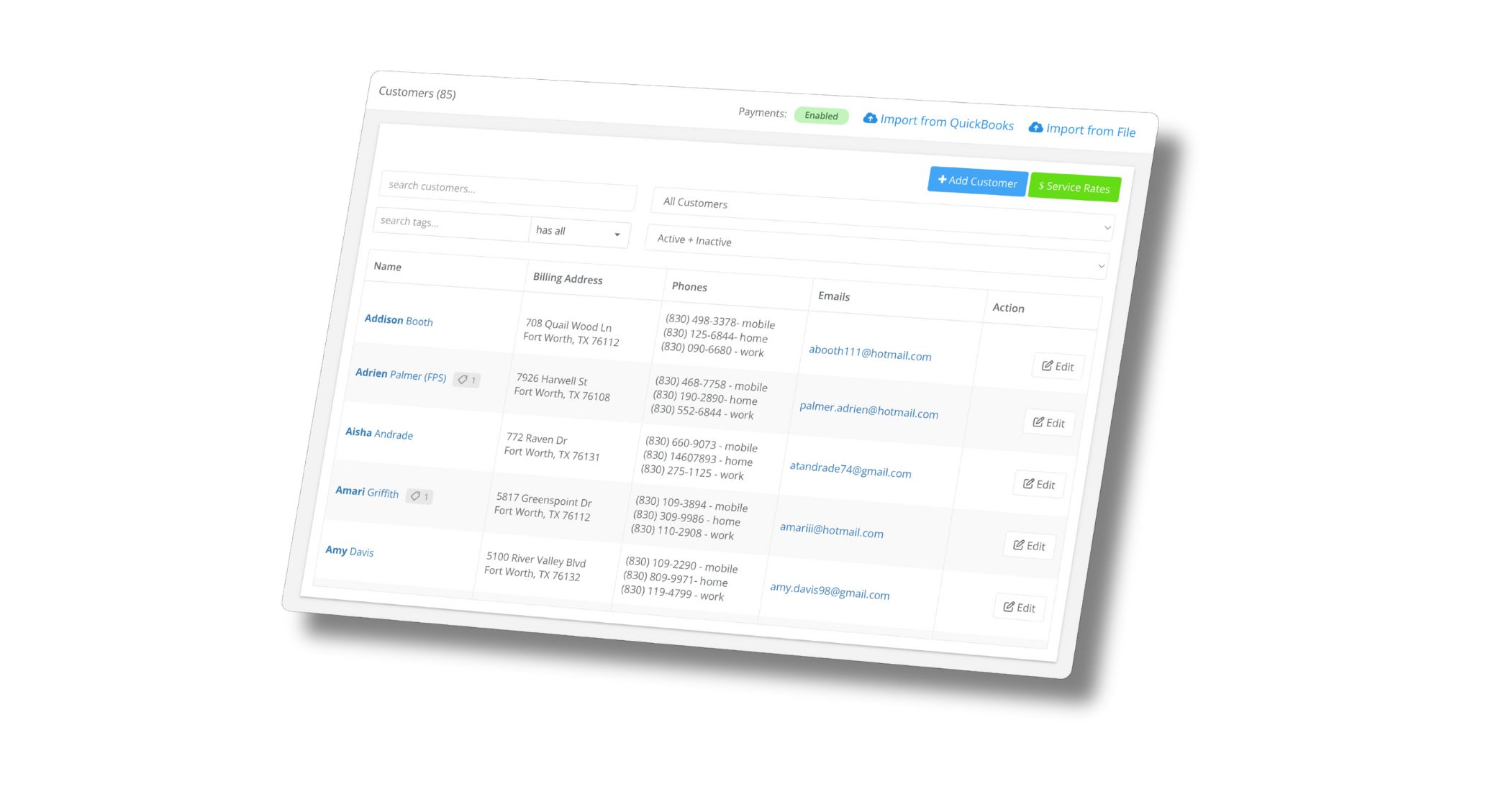
Pool owners expect clear communication and proof of service. When you consistently provide updates and documentation, you strengthen your reputation and make it easier to justify your pricing.
For growing companies, structured quoting and organized customer records also speed up sales. Clear proposals and fast follow-up help you win more work and convert opportunities into recurring revenue.
The result: stronger retention, faster approvals, and more predictable growth.
Field service & office management features
Your field and office teams should operate from the same source of truth.
Strong field service management gives you visibility into what’s happening in real time. The office can see progress throughout the day, confirm completed work, and quickly address changes without phone tag or confusion.
When schedules, service history, and job details are centralized, missed stops decrease and accountability increases. That consistency improves both customer satisfaction and internal performance.
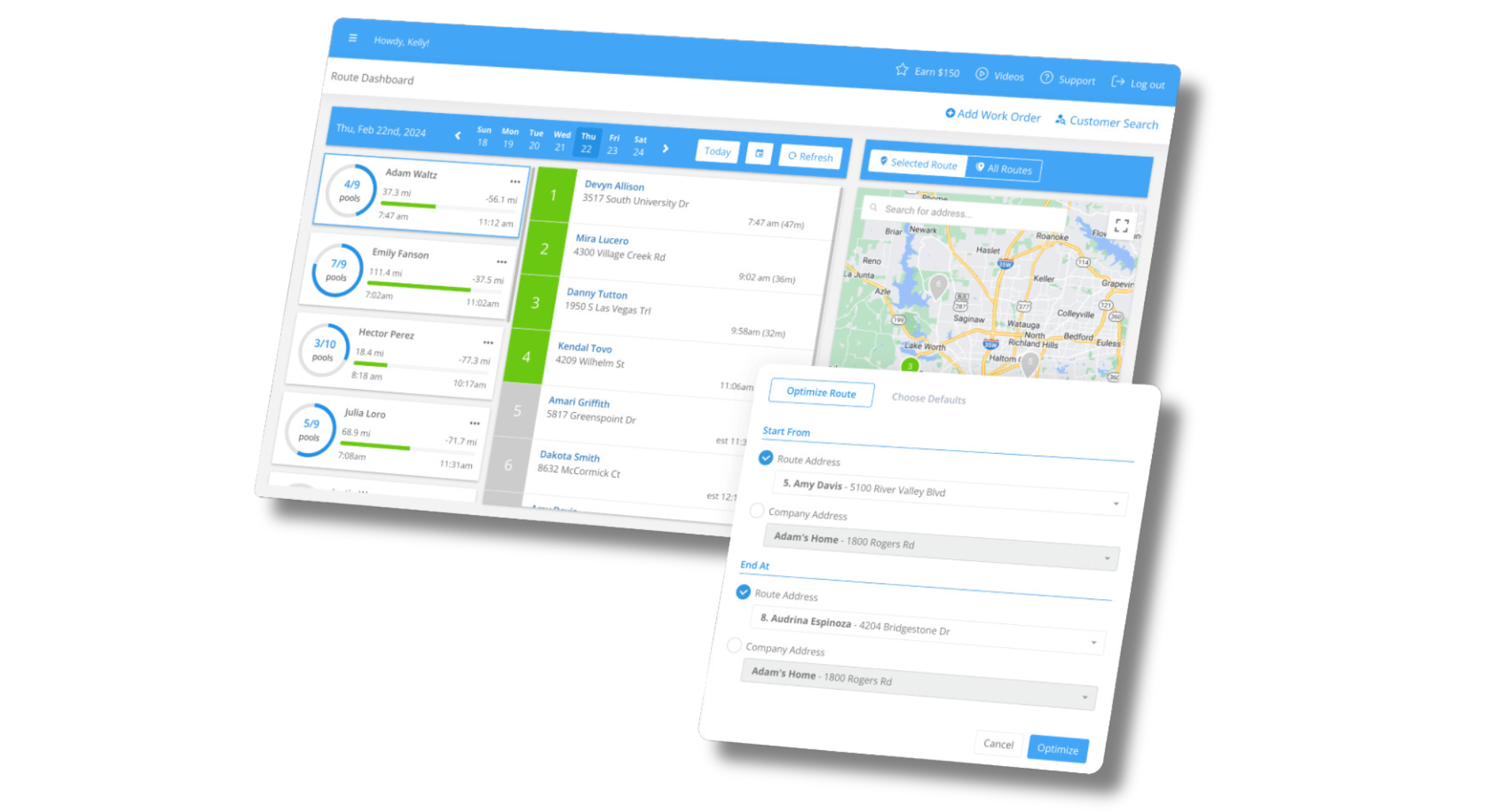
Efficient scheduling and routing also play a major role in profitability. Smarter route planning reduces windshield time, lowers fuel costs, and allows you to complete more stops per day without increasing headcount. As routes scale, balanced workloads protect technician morale and service quality.
Mobile access is also essential. Technicians need everything required to perform their jobs accurately and confidently, whether they’re online or offline. When field teams can document work quickly and correctly, service quality improves and the office stays aligned.
Equipment, chemical, and maintenance management features
Your business has operational demands that generic software often fails to address.
Tracking chemical usage, service history, and maintenance records helps protect your margins and your liability. Over time, usage data provides insight into rising costs and supports smarter pricing decisions.
Equipment and repair tracking bring clarity to installations, warranty work, and one-off jobs. When parts, service records, and account history are organized, billing accuracy improves and fewer details fall through the cracks.
Recurring maintenance management is especially important. Stable, repeat service is the foundation of predictable revenue. Systems that support recurring work reduce administrative friction and make it easier to scale consistent service across hundreds—or thousands—of pools.
Financial management and billing automation
Cash flow determines how fast you can grow.
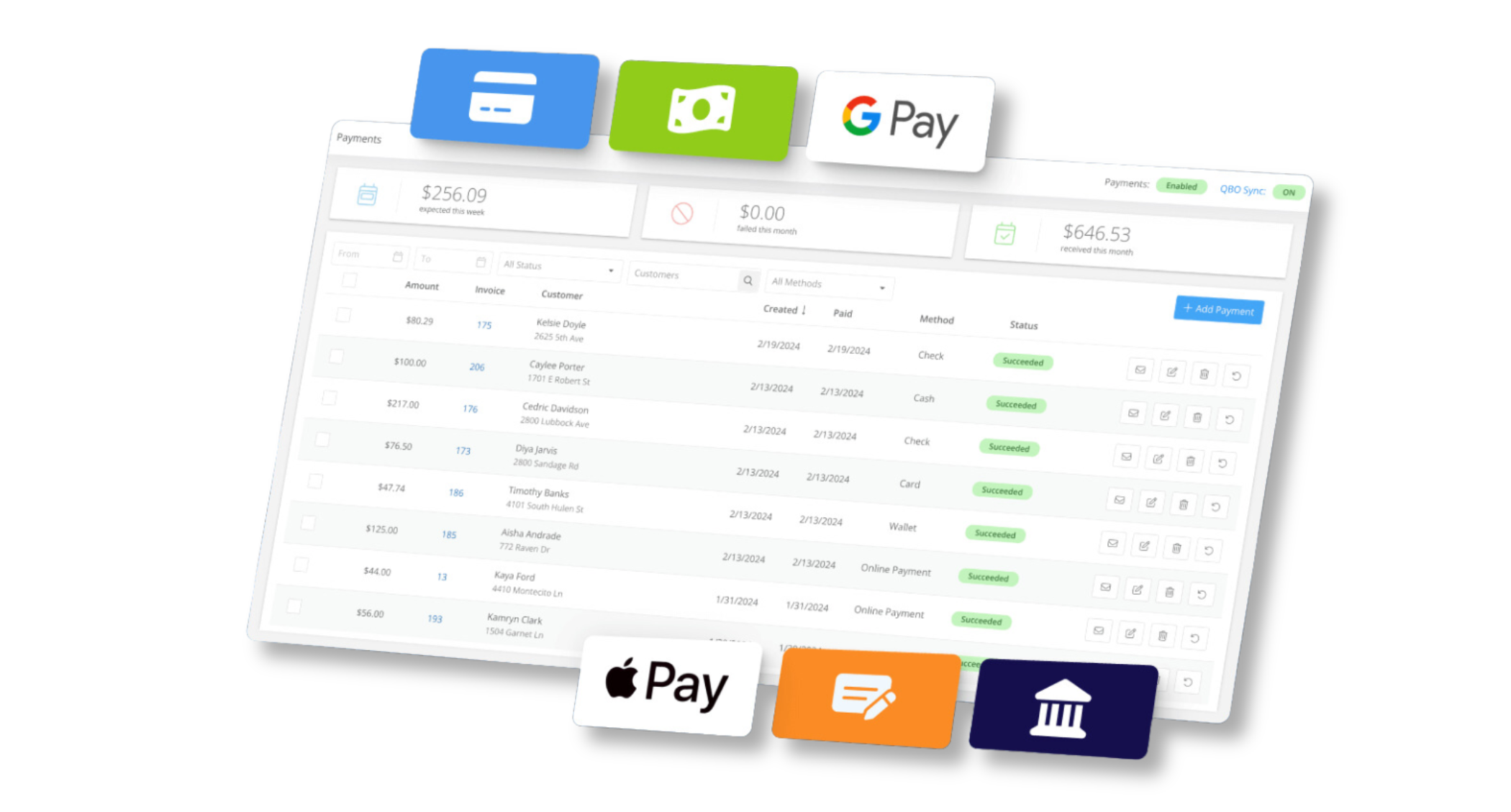
Automated billing reduces administrative workload and minimizes errors. When recurring invoices, payments, and reporting are streamlined, you spend less time chasing money and more time running your business.
Online payment options and automated payment processes shorten the billing cycle and improve consistency in cash flow. Fewer outstanding balances mean fewer uncomfortable collection conversations and more financial stability.
Accounting integrations also matter. When your service software connects cleanly with your accounting system, you eliminate double entry, reduce bookkeeping errors, and gain clearer visibility into revenue and profitability.
For smaller companies, that clarity builds confidence. For larger operations, it supports disciplined financial management at scale.
Reporting and analytics for data-driven-insights
Good software lets you generate reports on profitability, labor, and chemical dosages, enabling data-driven insights. You can use this data to forecast chemical needs and make rate adjustments for unprofitable customers.
.avif)
Technician mobile app to access information from anywhere
Given that your techs are always on the go, any pool service software you invest in must come with a mobile app. These apps give your techs access to schedules, real-time updates on job changes, client information, and job details from anywhere. It also lets them log dosages with just a few taps, which makes tracking chemical use a breeze.

The right pool maintenance software does more than manage tasks. It improves visibility, strengthens customer relationships, protects margins, and creates the operational foundation required for sustainable growth.
Beyond features: What else should pool pros consider when buying software?
Software isn’t only about tools and functionality. The company behind the platform matters just as much. The right partner can accelerate your growth. The wrong one can slow you down for years.
Here are the non-product factors serious pool pros should evaluate.
Pool industry experience and focus
Pool service businesses operate differently than HVAC, plumbing, or general field service companies. Chemical tracking, recurring routes, filter cleans, seasonality, and service documentation all create unique operational demands.
A provider that focuses specifically on the pool industry understands these realities. That translates into smarter workflows, better long-term product direction, and fewer workarounds as your company grows.
Generic platforms often require heavy customization. Industry-focused systems are built around how pool companies actually run.
Commitment to innovation
Software should evolve as your business evolves. Look for a company that actively improves its platform, releases meaningful updates, and invests in modern technology. Stagnant software creates bottlenecks over time. You want a software partner that is building for the future of the industry—not maintaining the status quo.
Signs of long-term investment include:
- Consistent product improvements
- Clear roadmap direction
- Responsiveness to customer feedback
- Infrastructure that supports companies of all sizes
Scalability
The system that works for 80 pools should also work at 800, or 8,000. Many pool companies outgrow their software. Data becomes messy. Reporting becomes unreliable. Workarounds multiply.
Scalable platforms support:
- Multi-route operations
- Larger technician teams
- Advanced reporting needs
- Structured operational oversight
Even if you’re small today, choosing scalable software prevents disruptive migrations later.
Support & onboarding
Adoption determines whether software creates value. Strong onboarding ensures your data is structured correctly from day one. Ongoing support ensures your team stays confident using the system.
Evaluate:
- Responsiveness of support
- Availability of training resources
- Clarity of documentation
- Whether support teams understand pool service operations
When support understands your business model, problems get resolved faster and implementation friction decreases.
Data visibility
Your service history, customer records, chemical logs, and financial data are strategic assets. Ensure the platform gives you clear access to your data, reliable reporting, and transparency into how your business is performing.
Accurate data improves:
- Pricing decisions
- Route optimization
- Hiring plans
- Cost management
- Long-term forecasting
Software should increase visibility, not obscure it.
Reputation & community
Look at sites like Capterra for reviews (and note that the number of reviews can be just as important as the star rating).
Look for:
- Verified customer reviews
- Case studies
- Evidence of long-term customers
- Active user communities
Software adoption is easier when you’re choosing a platform trusted by operators who run businesses similar to yours.
Long-term partnership mindset
Finally, consider whether the company views itself as a vendor or as a long-term partner.
The best software providers:
- Understand your operational challenges
- Invest in customer education
- Provide strategic insight beyond the tool itself
- Align their success with your growth
Buying technology is a business decision and the provider you choose will influence how efficiently you operate, how confidently you scale, and how professionally you present your brand for years to come.
Choose accordingly.
What is the best software for pool pros?
Not all software performs the same, so weighing each software against your specific needs is crucial when choosing a suitable platform for you.
In the following section, we explore eight of the top pool service platforms and outline the pros and cons of each.
Skimmer: Specialized swimming pool service software that offers best-in-class support, ease of use, and pool-specific features
Skimmer stands out from the competition by offering a user-friendly platform with best-in-class customer support specifically designed for the unique needs of pool care businesses.
Compared to other platforms, Skimmer emphasizes ease of use and streamlined workflows that save busy pool professionals time and money. Skimmer also provides competitive pricing and seamless integration with QuickBooks Online, making it a cost-effective and robust software for your pool business.
Pros of Skimmer
- Features designed specifically for pool and spa service businesses. Skimmer excels in core functionalities that are important to pool service professionals, such as route management (e.g., real-time location updates to track technicians and route optimization), scheduling, job assignments, quoting both on mobile and desktop, invoicing and payments, customer management (including communication tools like Service Texts), integrations (including the Orenda LSI, LaMotte and Heritage) and reporting.
- It’s easy to use. Its user-friendly interface and intuitive design make it accessible to non-technical users and saves time and effort.
- Best-in-class live customer support. Quick response times and access to dedicated account managers highlight Skimmer’s commitment to support. Get support via email or live support calls from Monday to Friday, 8 am to 6 pm CT.
- Streamlined workflows. Skimmer can adapt to specific workflow needs.
- Transparent pricing. There are no hidden fees or extra surprise costs. You pay for each serviced location with a minimum spend (see pricing below).
- Scalability. Skimmer can manage your entire pool service operations regardless of business size. If specific features need to be included, the team can work with you to develop a roadmap for future development or potential integrations. The software can already integrate with QuickBooks Online (QBO) (side note: the QBO integration is free, while some software charges for it)
- Efficient invoicing. Features include pre-filled invoice templates for faster creation, QuickBooks integration for easy online invoicing and payments, and bulk invoicing options for multiple customers via email or SMS.
- Modern payment options, including consumer financing through Sunbit, credit card surcharging, autopay for recurring service and work orders, auto-suspend past-due customers, next day payouts and Instant payouts, and failed payment alerts and dispute handling at no extra cost.
- Innovation. Skimmer adapts and innovates quickly, offering an advantage over established competitors.
- Risk-free 30-day money-back guarantee:
- Free guided demo where a product specialist will showcase specific features and address your concerns.
- Limited free trial available.
- If you’re not happy with the product, cancel and request a refund within the first 30 days to get your subscription fee back.
- Unique scheduling and dispatching features (e.g., route optimization, drag-and-drop scheduling) which offer numerous advantages:
- Real-time updates: Technicians can update progress on the go, providing a dynamic view of route completion.
- Mobile-friendly interface: Access and update schedules easily from mobile devices.
- Customizable views: Offer different ways to visualize route assignments based on user preference (e.g., list and map).
- Unlimited users—no restrictions on the number of users that can access and use the software.
Cons of Skimmer
- It doesn't have as many features as some other platforms, but it focuses on features that are important to pool pros, such as route management, billing, quotes, jobs and work orders.
- Younger brand compared to some other platforms on this list.
- No GPS tracking, but you can access real-time location updates to monitor technicians’ progress and optimize routes based on schedules and technician locations.
Skimmer Pricing
Skimmer has tiered pricing so pool pros can choose a package that works for their stage of growth.

See how Skimmer compares to other top pool service apps.
Pool Brain: Specialized platform with limited support

Pool Brain is a pool service platform designed to help businesses manage operations, optimize workflows, and improve customer service. It focuses on a broad feature set and competitive pricing, but customer support needs to be improved, and some users report that the software can be buggy.
Pros of Pool Brain
- Comprehensive feature set, including work orders, checklists, online payments, QBO integration, and reports.
- Access to a powerful customer portal to view past jobs and routes.
- Scalability. The software can grow with your business.
- Customizable to any situation. You can change the name of the body of water.
- A mobile app that’s accessible on the go.
- A Langelier Saturation Index (LSI) calculator is available on the web and mobile.
- A free one-month trial is available to test the product.
Cons of Pool Brain
- Users complain about its bad UI. The mobile app could be more intuitive and easier to use.
- The software can be buggy with glitches and lag.
- Customer support needs to be improved, as there is no live support. Users can only access a chat box, response times are slow, and there is limited support for complex issues.
- Some users have reported occasional integration issues when syncing data in QuickBooks.
- Pricing does not include unlimited users. You pay extra for each pool tech per month (see below).
Pool Brain Pricing
$10/month provides access for unlimited office users, while each tech per month costs $55.
See how Skimmer compares to Pool Brain.
POOL360 PoolService by PoolCorp: A platform with a strong reputation but an app that’s difficult to use

POOL360 PoolService is a business management software for pool and spa professionals. It’s a product of PoolCorp, the world’s largest wholesale distributor of swimming pool supplies and equipment.
POOL360 PoolService helps pool businesses manage customers, orders, inventory, employees, and finances.
While POOL360 PoolService has a strong reputation due to its PoolCorp backing, the app is challenging to use due to bugs and sign-up issues.
Pros of Pool360 PoolService
- Comprehensive features that include quoting, invoicing, payments, equipment tracking, guided feedback, proof of service emails, routing and scheduling, and reports.
- Seamless integration with PoolCorp’s extensive product and service offerings makes it ideal if you’re already in their ecosystem.
- The software has a strong reputation, as it’s backed by PoolCorp, a leading industry player with an established market presence. This instills confidence in the product among pool care pros.
- Pricing is integrated with POOL360, which simplifies pricing management, ensuring consistency between software usage costs.
- Offers complimentary marketing promotions for customers, which may include loyalty programs and discounts.
- Dedicated customer support is provided.
- 60-day free trial.
Cons of Pool360
- Users need to provide a lot of data in the sign-up process.
- The app is challenging to use due to many glitches, bugs, and sign-up issues.
- Only customers that use POOL360 can create a POOL360 PoolService account
- The mobile app does not work well offline
- Pool pros are concerned that PoolCorp's acquisition of Pinch a Penny franchises will lead to them collecting extensive customer data during sign-up and potentially using it for their own purposes.
- No invoice generator. Pros have to open each completed work order and convert to invoice, then send it to QBO.
Pool360 Pricing
$1 per month for each service location.
Paythepoolman: Feature-rich software with excellent support that lacks personalization

Paythepoolman is a pool service management software designed to streamline operations, optimize workflows, and improve efficiency for pool service businesses.
While you get access to many features, affordable pricing, and strong support, the software is not intuitive, support lacks personalization, and there may be hidden charges.
Pros of Paythepoolman
- A broad feature set includes optimized routing, income and expense logging, work orders, checklists, automated and recurring billing, GPS tracking, QBO integration, a customer-facing app, payroll, fleet management, inventory management, and reports.
- Fast and easy billing, with customers able to create invoices in a matter of minutes.
- Excellent support via email, text, and live support calls. The support hours are from Monday to Friday, 8:00 am to 4 pm EST. You also have access to how-to videos on their YouTube channel.
- Feature development is based on user feedback, so the software grows with you.
- The mobile app provides access on the go.
- The ability to quickly view your LSI index.
- Affordable pricing compared to some competitors.
- 80% OFF for 3 Months
Cons of Paythepoolman
- Hidden charges.
- Smaller company with potentially less established industry presence.
- The software has minor bugs and functionality limitations.
- A bad UI, with some users reporting a subpar user experience.
- The pricing does not include unlimited users. You pay an extra $10/month per tech and $15/month for access to the customer-facing app
- Support needs more personalization, and some users have reported a lack of professionalism.
- Clients don’t have access to a dedicated account manager.
- Running a business in separate apps creates extra complexity, demands more training, and makes onboarding harder for staff.
Paythepoolman Pricing
Pricing follows a freemium basic plan model with paid tiers based on features and user count (starting at $50/month + $10/tech).
See how Skimmer compares to Paythepoolman.
Pool Office Manager: Easy-to-use software tailored to seasonal pool pros

Pool Office Manager is a pool service management platform designed to help pool service companies streamline operations, automate tasks, and improve efficiency. It provides features tailored to seasonal pool care companies.
Pros of Pool Office Manager
- Comprehensive features tailored to seasonal pool care businesses, including customer reporting, inventory management, scheduling and GPS tracking, chemical calculator, invoicing and billing, and CRM capabilities.
- Easy to use for non-technical pool pros.
- The mobile app provides access on the go.
- Easy invoicing to get paid fast. Create automated, recurring, or custom invoices in a few clicks.
- A CRM makes it quick and easy to access customer information.
- One-way QBO integration.
- Free 30-day trial to test the product.
Cons of Pool Office Manager
- Some customers mention bugs and limitations in certain features.
- Users have reported recurring stability issues, inconsistent quality assurance across updates, and a growing perception that feedback is being absorbed without corresponding improvements to their experience.
- Charges $25 for the QBO integration that other platforms offer for free.
- There are more affordable platforms on this list.
Pool Office Manager Pricing
The price is $125 per user per month for the first user and $25 per user per month per extra user. A fleet rate applies to more than 12 users.
See how Skimmer compares to Pool Office Manager.
Lou (Evosus): Complex software for large businesses that has a steep learning curve

LOU is cloud-based management software designed for pool, hot tub, and spa businesses. It helps businesses manage all aspects of operations, including retail, service, inventory, accounting, warehousing, back office, and administration.
The solution offers many features, can scale with your business, and has a strong track record in the software industry. However, the price is much higher than any software on this list, and more features mean a steeper learning curve.
Pros of Lou
- Comprehensive feature set covering all crucial aspects of pool service management, including quotes and invoicing, scheduling and dispatch, customer portal, reporting, work order management, and chemical usage tracking.
- Cloud-based means it’s easily accessible from any device and anywhere with an internet connection.
- Easy to use once you’re all set up.
- Scalable, so it grows with you as your business grows.
- Integrations with leading industry-specific software and tools.
- Established company with a strong track record in the software industry.
- Strong customer support is available via email, telephone, and the Lou knowledge base.
Cons of Lou
- A high one-off starter fee in addition to monthly licenses.
- A focus on larger businesses means it’s less suitable for smaller ones with simpler needs.
- It may not offer the level of customization needed for highly specialized pool businesses.
- Steep learning curve due to too many features.
- Customer support may be strong, but it still needs to be improved compared to platforms like Skimmer, which are more personalized and highly responsive.
Lou Pricing
There’s a once-off startup fee (Pro plan for $1,999 and Enterprise plan for $4,999) in addition to monthly/user licenses and other add-ons(e.g., if you need five people to access Lou, you’ll need five licenses).
For instance, a service license costs $49 per user per month on the Pro plan and $79 per user monthly on the Enterprise plan.
Jobber: An intuitive platform for service businesses that has a strong reputation but lacks pool-specific features

Jobber is a cloud-based field service management software designed to help home and field service businesses streamline operations, schedule jobs, manage payments, and improve customer communication.
While the company has a strong reputation amongst service businesses and offers an intuitive platform with many features, the features aren’t necessarily tailored to pool pros.
Pros of Jobber
- Many features cover all aspects of field service management, including quoting and invoicing, scheduling and dispatch, job management, reporting, marketing automation, and customer management.
- User-friendly interface on both the web and the mobile app.
- Strong brand recognition and established presence in the home service industry.
- Integrations with industry-specific tools and platforms like QuickBooks for accounting and Mailchimp for email marketing.
- Excellent customer support and training resources. You can access support via email, chat box, and phone from Monday through Friday, 8 am to 9:45 pm ET.
- Access to a community forum where users can share tips and best practices, ask questions, and get advice on running their businesses.
- Free one-on-one coaching is provided to get you up and running.
- A free trial is available with all plans.
Cons of Jobber
- Pricing for small businesses might be higher than some competitors.
- Some users mention limited customization options for highly specialized needs.
- Not as niche-focused compared to some competitors targeting specific industries. For instance, the features provided are not pool-specific.
- User limits per plan (see pricing below) with a cost of $29/month per additional user.
- Users must give contact information to get trial details.
Jobber Pricing
Six plans are available across multiple categories:
Individual
- Grow: $149/month/user
- Connect: $99/month/user
- Core: $29/month/user
Teams
- Plus: $529/month
- 15 users
- Grow: $299/month
- 10 users
- Connect: $149/month
- 5 users
See how Skimmer compares to Jobber.
ServiceTitan: A well-respected horizontal platform lacking pool-specific features

ServiceTitan offers a comprehensive cloud-based field service management software platform for trade businesses, including plumbing, pool, HVAC, and electrical. It helps manage all aspects of operations, from customer relationship management (CRM) and marketing to dispatching and invoicing.
ServiceTitan is well respected among trade businesses, but like Jobber, it’s a horizontal platform. It’s not specifically designed for pool service businesses, so it lacks tailored features for pool pros.
Pros of ServiceTitan
- Comprehensive feature set specifically designed for trade businesses.
- Users can access support via live chat, mail, or telephone.
- Strong industry expertise and understanding of trade-specific challenges.
- Robust mobile app for field technicians.
- Advanced marketing automation and customer communication tools.
- Large and established company with a strong reputation in the industry.
- A strong sense of community around the product.
Cons of ServiceTitan
- It is not a specialized platform specifically designed for the pool care business, so features may be lacking.
- Support needs to be improved. Despite the availability of support channels, users report that ServiceTitan is slow to respond and deal with their issues.
- Not easy to use compared to some other platforms on this list.
- Some users report bugs and glitches with the software.
- Expensive compared to some competitors, especially for smaller businesses.
- Complex platform with a steeper learning curve.
- Limited customization options compared to some niche-specific solutions.
- No chemistry tools. Pool pros must rely on third-party apps like Orenda or paper logs.
ServiceTitan Pricing
*Pricing starts at $398/month and increases with the needs of individual contractors. ServiceTitan requires the purchase of an annual contract and does not charge additional fees for office staff members.
*Note: As of our recent republishing, we were unable to confirm current pricing data.
See how Skimmer compares to ServiceTitan.
New pool service apps
A growing number of newer platforms have entered the pool service market in recent years, offering fresh interfaces and feature sets that aim to address gaps left by more established solutions. These products can be worth exploring, particularly for businesses that find legacy platforms too rigid or expensive. That said, most have limited track records, smaller user bases, and less documented reliability under real-world operational demands. Pool pros considering these options should weigh the potential benefits against the practical risks of building core business workflows around software that has not yet been tested at scale or over time.
Pool techy: Marketplace-style platform with limited real-world adoption data
PoolTechy is built as a three-way marketplace connecting pool owners, pool contractors, and pool technicians, with in-app offers, payments, service records, messaging, and contractor/tech payouts described in its app listing and terms. It also markets itself as a pool business platform with features like offline-first field logging and an LSI calculator.
Pros of PoolTechy
- No monthly subscription for the “Business Starter” tier ($0), and it markets “no monthly subscriptions, no contracts.”
- Good support contact options (phone + email + support form).
- Marketplace: it states contractors can list offers and pool owners can compare or purchase through the app.
Cons of PoolTechy
- Pricing details vary by payment method and include multiple layers: the FAQ says PoolTechy “adds a small platform fee on top of Stripe’s merchant fee,” and then lists different effective pricing for ACH vs card and for auto-invoicing vs manual invoices.
- Limited review volume so far (for credibility/social proof): Google Play shows 12 reviews and 1K+ downloads, which is still a small sample compared to mature platforms.
PoolTechy Pricing
- Business Starter: $0.
- Growth & Auto-Invoicing: 0.89% + 30¢ per visit (PoolTechy notes “no additional merchant fees” on this tier).
- Pro & Manual Invoicing: 0.89% + $1 per invoice (also labeled “no additional merchant fees”).
- FAQ adds additional breakdowns by payment type (ACH vs card) and explicitly frames their fee as a platform fee layered on top of Stripe’s merchant fees.
BlueRoute: Pre-launch platform with limited public details available
BlueRoute is positioning itself as pool route software with “smart route optimization, customer management, and automated billing,” but there isn’t much public product detail to validate yet
BlueRoute Pricing
Pricing is free - you only pay for payment processing at a locked in rate of 3%.
Top questions to ask when buying pool business software
Ultimately, it’s up to you to decide what software is going to be the best fit for your company. The biggest thing to remember is that you’re looking for a partner, not just a software provider– especially if this is your first time using business software. A good feature set is important, but prioritizing ease of use and strong customer support will help ensure you’re set up for success from the start.
Check out the list below for 10 questions you should be asking to ensure you’re getting software that’s a great fit for you and your team.
- Is it purpose-built for pool service? General field service apps won't include pool-specific features like chemical logging, equipment tracking, or industry workflows. Specialized software is built around how pool businesses actually operate.
- What is the company's reputation? Research their track record, read reviews from other pool pros, and talk to people in the industry. A little due diligence upfront can save significant time and money later.
- How is their customer support? Look for a live, in-house support team that responds quickly and can troubleshoot real problems. This matters most when your team is new to the platform or something goes wrong mid-route.
- Do they have an active development team? Consistent updates and new features signal that the vendor is investing in the product. Stagnant software becomes a liability over time.
- Is the interface easy to use? A clean, intuitive design reduces the learning curve and improves adoption, especially among field technicians. Evaluate the mobile experience specifically, not just the desktop version.
- Can it scale with your business? Your needs will change as you grow. Confirm the vendor offers plans that support growth and can migrate your data with minimal disruption.
- Does it support in-app payments? Integrated payment processing simplifies billing and makes it easier for customers to pay, which helps reduce outstanding balances.
- How secure is it? Customer data should be protected by standard security measures including encryption, firewalls, and SSL. Ask vendors directly about their security practices.
- Does it integrate with your other tools? At minimum, look for QuickBooks Online integration. Seamless connections between your software stack reduce double entry and keep your data consistent.
- What does onboarding and ongoing training look like? Implementation support is expected, but confirm that training resources and support remain available after go-live, not just during setup.
Final thoughts on pool service software
Running a pool service business requires control over service visits, recurring maintenance, chemical usage, billing, and customer communication.
An all-in-one pool service management software platform gives you that control. It connects office staff, pool technicians, and customers through centralized job management, route optimization, dispatch, chemical management, automated invoicing, and customer experience tools.
If you’re interested in diving in and learning more about Skimmer’s pool service platform, get in touch with us today at (855) 452-1737 or book a demo.


